What is Code 39? Structure, Applications, and How to Generate It
In today’s modern world—where every process is geared toward accuracy, speed, and traceability—barcodes have become an essential “language” in the management of goods and information.
Among the most common barcode standards, Code 39 stands out for its simplicity, ease of implementation, and high compatibility with many device systems. As one of the first alphanumeric barcode types, Code 39 is widely used in healthcare, industry, defense, and supply chains.
In this article, iCheckQR will help you understand what Code 39 is, its structure and how it works, along with a step-by-step guide to generate Code 39 barcodes for free and with high accuracy. Additionally, we provide real-world application examples to help you integrate Code 39 into your business management system effectively and professionally.
 1. What is Code 39? Definition and History
Definition of Code 39
Code 39 is a linear (1D) alphanumeric barcode type, capable of encoding both letters (A–Z), numbers (0–9), and a few special characters (such as “-”, “.”, “$”, “/”, “+”, “%”, and space).
Each character in Code 39 is represented by a combination of 9 bars and spaces, including 3 wide elements, which gives it the name "Code 3 of 9."
This barcode standard was first developed in 1974 by Intermec Corporation, with contributions from barcode expert Dr. David Allais, a pioneer in Automatic Identification (AutoID) technology.
Thanks to its simplicity, no requirement for a checksum, and easy readability by most modern 1D barcode scanners, Code 39 is commonly used today for labeling and identifying assets, products, documents, and trackable items.
 Popular Applications of Code 39
Due to its reliability and flexibility, Code 39 is used across multiple industries:
Logistics and inventory management: Encodes order numbers, cartons, and pallets, allowing fast tracking across the supply chain.
Healthcare: Used on medical records, patient wristbands, and medical devices to enhance safety and accuracy in treatment.
Industrial manufacturing: Applies to components, semi-finished goods, and tools to track product lifecycle and production stages.
Defense and military: Employed in asset identification systems, compliant with MIL-STD-1189 (U.S. Department of Defense standard).
Case Study: Using Code 39 in Medical Equipment Management
Several hospitals have implemented asset management systems using Code 39 barcodes to monitor and manage medical devices. For instance, GigaTrak’s medical equipment tracking software allows users to create custom barcode labels—including Code 39 format—to attach to equipment such as wheelchairs, hospital beds, and monitoring devices. This helps medical staff quickly locate devices, track maintenance history, and comply with healthcare regulations.
In addition, a study conducted at the Federal University of Minas Gerais Hospital (HC-UFMG) in Belo Horizonte, Brazil, showed that applying an effective medical equipment management system—including barcode tracking—enhanced the efficiency of equipment maintenance and overall management.
2. Structure and Encoding Principles of Code 39
Structural Components of Code 39
Code 39 includes 43 characters: 26 letters, 10 digits, and 7 special characters.
It starts and ends with an asterisk (*), which serves as the start/stop character.
 Code 39 is a linear (1D) barcode system with a clear and standardized structure, comprising a total of 43 valid characters, including:
26 uppercase letters: A to Z
10 digits: 0 to 9
7 special characters: -, ., space, $, /, +, %
Each Code 39 string must be enclosed by a start and stop character—the asterisk *. This character does not represent actual data, but instead marks the boundaries of the barcode, helping the scanner identify the beginning and end.
Example: Encoding the string “iCheckQR 123” will result in the actual barcode format: *ICHECKQR 123*
 Note: The space between characters also plays an important role in the encoding process.
Encoding and Decoding Principles of Code 39
Each character in Code 39 is encoded using a combination of 9 elements:
5 black bars
4 white spaces
Among these 9 elements, only 3 are "wide", while the rest are "narrow". The unique arrangement of wide and narrow bars and spaces produces the distinctive encoding for each character.
The standard structure of Code 39 does not require a checksum, making it easy to implement. However, some applications may choose to include an optional checksum (commonly using the Modulo 43 algorithm) to enhance data reliability.
Example: The character “A” is encoded as a sequence of bars and spaces in the following pattern: narrow bar, wide space, narrow bar, wide space, narrow bar, narrow space, narrow bar, narrow space, wide bar
3. Comparing Code 39 with Other Barcode Types
Code 39 vs. Code 128 and QR Code
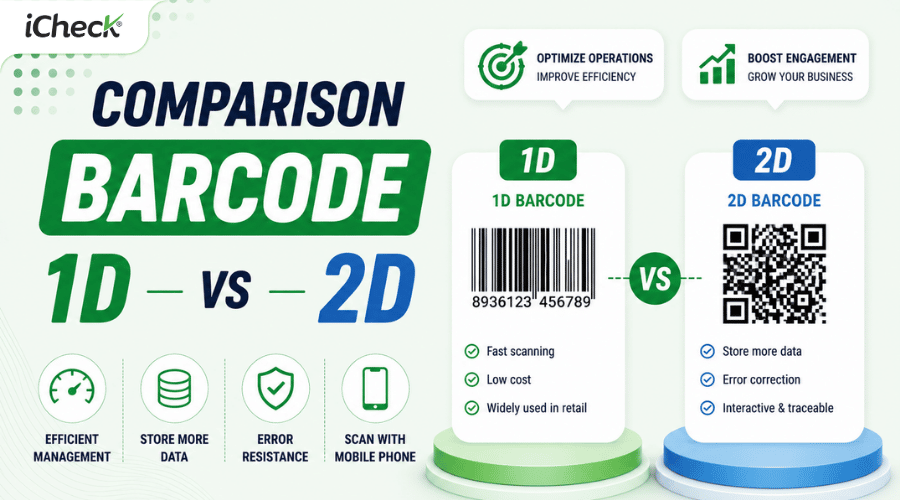
Each barcode type has its own advantages and limitations depending on the usage context. Below is a comparison of the three most common barcode types:
Conclusion:
Code 39: Ideal when long data encoding is not required and compatibility with existing hardware is a priority.
Code 128: A better option for compact spaces and complex data.
QR Code: Best suited for end-users, mobile devices, and interactive applications.
Advantages and Limitations of Code 39
Key Advantages:
Easy to generate: Can be printed using any printer that supports barcode fonts or common software tools.
No checksum required: Simplifies processing by eliminating the need for complex verification.
Widely supported: Compatible with most standard 1D barcode scanners.
Beginner-friendly: Requires no advanced configuration or setup.
Notable Limitations:
Code length increases rapidly with the number of characters → results in a large barcode size, taking up significant print space, making it unsuitable for compact environments.
Limited security: Data is not encrypted or obscured.
Not suitable for large or complex datasets.
 4. How to Generate a Free and Accurate Code 39 Barcode
Create Code 39 Barcodes Using Excel and Word
Step 1: Download and Install a Free Code 39 Font
Visit a trusted website to download a free Code 39 font (e.g., "Free 3 of 9").
Once downloaded, extract the file, right-click on the font file, and select Install to add it to your system.
Step 2: Add Asterisks (*) to the Beginning and End of the Code String
Open Excel or Word and enter the data string you want to encode.
To ensure the Code 39 barcode functions properly, you must add an asterisk (*) at both the beginning and end of the data string.
For example:
Original string: ABC123
Encoded string: *ABC123*
Note: The asterisk (*) does not represent part of the actual data. It serves as the start and stop symbol for the Code 39 barcode.
Step 3: Format the Font and Print the Barcode
Highlight the encoded string (including the asterisks).
Change the font to Code 39 (or the specific name of the font you installed, such as "Free 3 of 9").
Adjust the font size so the barcode displays clearly and is suitable for printing.
Print the document to use the barcode on products, documents, or labels.

Important Notes
Code 39 supports the following characters: uppercase letters (A–Z), numbers (0–9), and a few special characters: -, ., $, /, +, %, and space.
You do not need specialized software—Microsoft Word or Excel with a Code 39 font is sufficient.
Ensure your printer has adequate resolution to produce clear, scannable barcodes for accurate reading by scanners.
Besides creating barcodes using Excel or Word, you can also generate barcodes online for free using tools such as iCheckQR.
5. Real-World Applications of Code 39 in Warehouse and Logistics Management
Integrating Code 39 into POS and ERP Systems
Code 39 barcodes, with their ability to encode both letters and numbers, are widely used in integration with management systems such as POS (Point of Sale) and ERP (Enterprise Resource Planning). This integration offers several benefits:
Data synchronization: Automatically and accurately updates product, inventory, and order information across departments.
Enhanced operational efficiency: Minimizes errors from manual data entry and optimizes sales and inventory processes.
Improved customer experience: Provides quick access to product information, facilitating smoother checkout and after-sales support.
According to Hicron Software, integrating POS and ERP enables businesses to gain a comprehensive view of operations—from sales to inventory and financial management—improving both efficiency and profitability.
 Inventory Control and Traceability Using Code 39
Code 39 is effectively applied in inventory control and traceability within the supply chain:
Inventory management: Attaching Code 39 barcodes to each product allows for tracking quantities, locations, and item statuses in the warehouse.
Traceability: Enables identification of batch information, manufacturing date, expiration date, and supplier, ensuring product safety and transparency.
More efficient stocktaking: Using barcode scanners reduces inventory audit time, minimizes errors, and increases accuracy.
According to Pallite Group, barcode technology—including Code 39—has redefined inventory management by enabling real-time data updates and automated order processing, leading to improved warehouse performance.
6. Frequently Asked Questions About Code 39
Does Code 39 require a license or royalty fee?
No. Code 39 is a royalty-free barcode standard and does not require a license for use. You can create and print Code 39 barcodes using free barcode fonts or software such as GNU Barcode or Zint.
Can Code 39 be used in retail systems?
Yes, it can—but it is not recommended. Code 39 has a low data density, which results in longer barcodes that take up more print space. In retail environments, standards such as EAN-13 or UPC are preferred because they are more compact, globally standardized, and optimized for POS (Point of Sale) systems.
How can I encode long data efficiently?
To encode long data while maintaining efficiency, you can:
Switch to Code 128: This barcode has higher data density, allowing for shorter barcode lengths.
Use 2D barcodes like QR Code or Codablock: In particular, Codablock A, a stacked version of Code 39, can encode up to 1,340 characters in a more compact format.
Optimize the encoded content: Use abbreviations or shortened identifiers to reduce the overall data length.
Conclusion
Code 39 is not just one of the oldest barcode standards—it remains a reliable encoding solution for various modern industries. With its broad character support, ease of implementation, royalty-free use, and high flexibility, Code 39 continues to play an important role in inventory systems, traceability, and automation.
From simple barcode creation using Excel or Word, to integration into POS, ERP, WMS, or other warehouse management systems—Code 39 can seamlessly become a core part of your digital process transformation strategy.
If you're looking for a barcode type that is simple, easy to adopt, and suitable for basic to moderate-level management needs, Code 39 is a great place to start.