

QR Code Tracking: How to Measure QR Campaign Performance from A to Z
Many businesses print QR codes on packaging, standees, and flyers — then have no idea whether anyone scanned them, where, or what happened next. That's not a QR code problem. That's a tracking problem.
QR tracking gives businesses precise answers: who scanned, where they scanned, when they scanned, and — most importantly — whether that scan led to a conversion. Without this data, a QR code is just a square on paper.
What Is QR Code Tracking?
QR code tracking is the process of recording and analyzing user behavior immediately after a QR code is scanned. Instead of sending users directly to a destination URL, a tracked QR code routes traffic through an intermediate redirect layer — where the system logs data before forwarding the user to the final page.
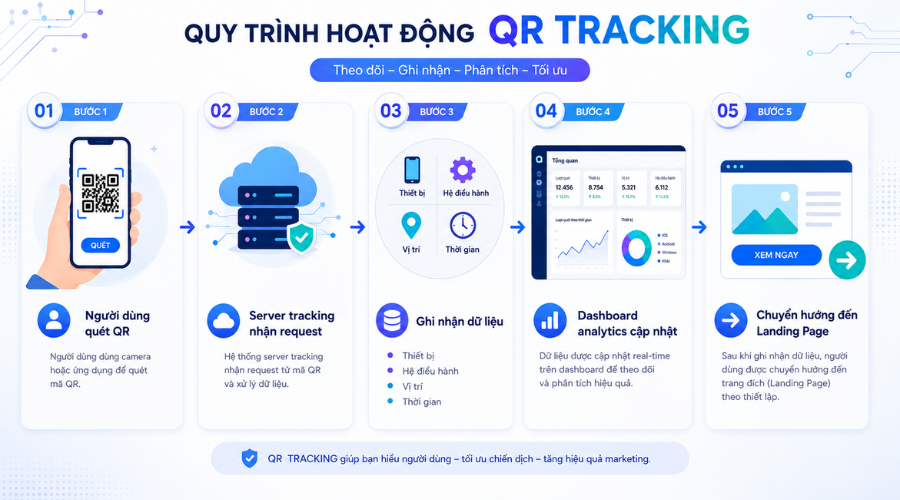 QR code tracking helps businesses measure the effectiveness of offline-to-online campaigns instead of merely counting scans.
One important distinction: QR tracking is not just counting scans. It covers the full behavioral journey from the moment of the scan to the presence — or absence — of a conversion.
How Does QR Code Tracking Work?
QR tracking operates on a dynamic redirect model — each scan routes the request through an intermediary server rather than going straight to the destination URL. This is the mechanism that makes tracking possible.
Why dynamic QR codes can be tracked
Dynamic QR codes don't encode the destination URL directly into the code. Instead, they encode an intermediate URL (a short link or tracking URL). Every scan passes through the server, where data can be recorded, analyzed, and stored. The destination URL can be changed at any time without reprinting the code.
Why static QR codes can't be tracked deeply
Static QR codes encode the destination URL directly. There's no intermediate step — no opportunity to intercept the request and capture data. The only partial workaround is appending UTM parameters to the URL upfront, but even then, you won't get device data, location data, or accurate scan counts.
Static vs. Dynamic QR Codes: Which One Can Be Tracked?
Static QR Code
A static QR code encodes the destination URL directly into the code itself. When scanned, the device opens that URL immediately with no intermediate step. The URL cannot be changed after printing. For measurement purposes, you can append UTM parameters to the original URL so Google Analytics can identify the source — but there's no scan count, no location data, and no device-level insights.
Best suited for simple, non-analytical use cases: Wi-Fi access codes, fixed internal links.
Dynamic QR Code
A dynamic QR code points to an intermediate URL — typically a short link hosted by the QR platform. All scans pass through the server before redirecting, which means the destination URL can be updated at any time. The platform also provides full analytics and UTM tracking support.
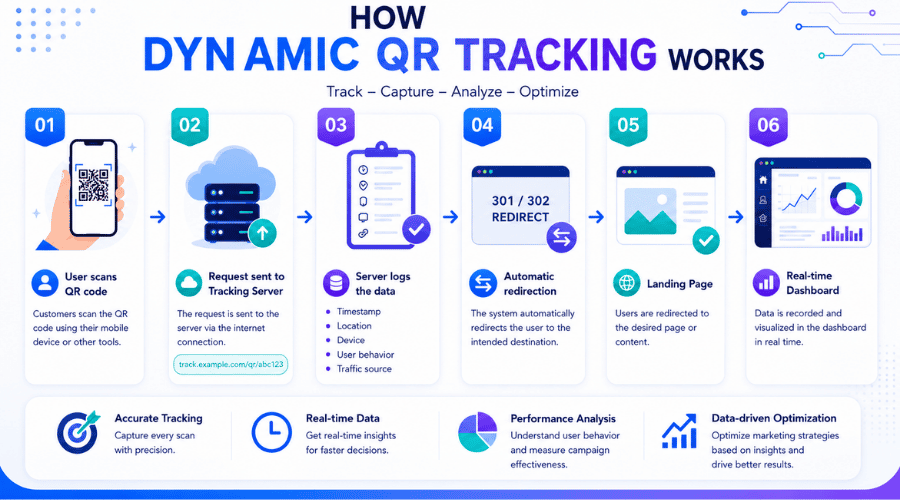 Dynamic redirect in QR code tracking — each scan is recorded by an intermediate server before landing on the destination page.
This is the default choice for marketing campaigns, product packaging, in-store POSM, and events.
What Metrics Can QR Code Tracking Measure?
Total Scans and Unique Scans
Total scans count every time the QR code is scanned, including repeat scans from the same user. Unique scans count only distinct devices or users. For example: 500 total scans but only 120 unique scans means the majority of activity came from a small group scanning repeatedly.
For brand awareness campaigns, unique scans matter more — they reflect actual reach. Total scans are more useful for measuring engagement frequency.
Location Tracking
Geographic data shows which cities or regions scans are coming from, down to the district level if the platform supports higher resolution. This is especially useful for multi-region campaigns: allocating POSM across locations, comparing performance by area, and adjusting distribution budgets accordingly.
Device and Operating System
Knowing the iOS vs. Android split helps prioritize landing page optimization. If 80% of scanners use iOS but the landing page loads slowly on Safari, conversion drop-off is predictable. Device data also informs decisions about deep-linking into an app versus redirecting to a mobile web page.
Scan Time and Frequency
Peak scan times reveal when users are most likely to engage. This is useful for scheduling push notifications, flash promotions, or evaluating the best placement timing for physical materials (for example, a QR code at a café might see peak scans between 7–9 AM and 2–4 PM).
Post-Scan Conversions
A scan is not the final KPI. A user who scans and bounces in three seconds creates no value. What matters is the action that follows: form submission, app install, purchase, booking, or whatever action is defined as the campaign goal.
To track conversions, QR tracking must be connected to Google Analytics 4 or an ad platform pixel via UTM parameters.
UTM Parameters and Google Analytics
UTM parameters function as a second tracking layer running alongside QR tracking. While the QR platform captures scan data (volume, device, location), UTM parameters feed that data into Google Analytics to connect it with the full user journey on your website.
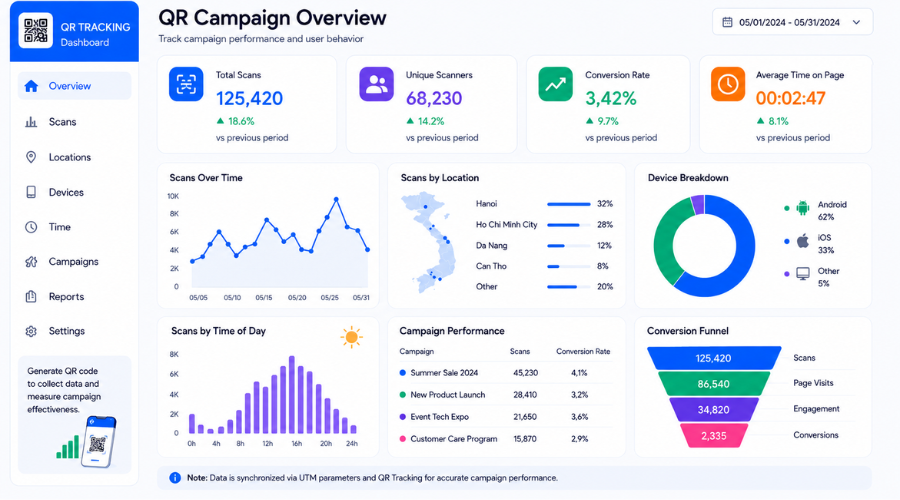 Provides a realistic insight into how QR code tracking data empowers businesses to make precise marketing decisions.
Summary of measurable metrics via QR code tracking:
Why QR Code Tracking Matters in Marketing
Measuring offline-to-online performance: QR codes are the only reliable bridge for measuring the impact of offline channels — packaging, in-store POSM, out-of-home placements, events. Without QR tracking, there's no way to know how much traffic a roadside banner or a product flyer actually generated.
Proving campaign ROI: QR tracking gives marketers hard data for reporting. Instead of saying "the campaign had strong reach," you can say "QR codes across 500 standees in the metro area generated 3,200 unique scans, 420 form submissions, and 87 purchases in two weeks." That's the language leadership and clients understand.
Optimizing CTAs and placements: Comparing scan rates between different QR positions — back-of-pack vs. front label, for instance — is a real-world form of A/B testing. The data tells you which placement performs better without guesswork.
Understanding customer behavior: Scan timing, repeat scan frequency, device usage — together, these paint a picture of how customers actually interact with your brand outside the digital environment. This kind of insight is hard to source anywhere else.
How to Set Up QR Code Tracking
Choose a Dynamic QR Platform
Popular platforms that support QR code tracking:
Bitly — Easy to set up, supports dynamic QR and basic analytics. Good for small businesses that need a fast, lightweight solution.
iCheck QR — Built for businesses managing QR codes across product packaging, in-store POSM, or domestic campaigns. Supports scan tracking, centralized code management, and offline marketing optimization through purpose-built QR tracking solutions for businesses.
QR Tiger — Detailed tracking by scan volume, device, and region. Supports bulk generation for large-scale campaigns.
Beaconstac — Focused on marketing use cases and campaign performance measurement.
Flowcode — Strong QR customization and real-time visual analytics dashboard.
Google Campaign URL Builder combined with a QR generator — Works if you only need UTM tagging and GA4 conversion tracking, but offers almost no standalone scan analytics.
Platform selection criteria: real-time analytics, data export support, API or GA4 integration, and flexibility for the volume of QR codes you need to generate.
Add UTM Parameters
UTM parameters bring scan data into Google Analytics. A standard UTM URL for a QR campaign looks like this:
https://yourwebsite.com/landing-page
?utm_source=qr_code
&utm_medium=print
&utm_campaign=summer_packaging_2024
&utm_content=front_label
Naming conventions to follow consistently:
utm_source: the QR distribution channel (qr_code, event, packaging)
utm_medium: the material type (print, posm, ooh, standee)
utm_campaign: campaign name (lowercase, underscores instead of spaces)
utm_content: distinguishes individual QR codes within the same campaign (front_label, back_label, posm_a3)
Connect Google Analytics
Once your UTM URL is ready, paste it into your QR platform when creating the dynamic code. In GA4, go to Reports → Acquisition → Traffic Acquisition and filter by Source/Medium to view QR-sourced traffic. Create a custom segment (utm_source = qr_code) to isolate and monitor QR performance separately.
If you're using GA4 with the Measurement Protocol, you can send custom events from the tracking server to record scans even when users can't reach the landing page — for example, due to slow connections or redirect errors.
Set Up Conversion Tracking
Define your conversions specifically before deploying. In GA4:
Go to Configure → Events, then create a new event or mark an existing one as a conversion.
Examples: form submission, purchase, app store click, phone call click.
Make sure the landing page has a GA4 tag or GTM container installed. Without it, conversion data won't be recorded even if QR tracking is running correctly.
Test Before Deploying
Scan the QR code on at least two devices (iOS + Android)
Confirm the redirect goes to the correct destination URL
Open GA4 real-time reports → verify the session appears with the correct UTM parameters
Complete a test conversion (submit the form, click the CTA)
Check the conversion event in GA4 real-time
Check the QR platform dashboard → confirm scan count increases
Test on a mobile data connection (not just Wi-Fi) to validate real-world redirect speed
QR Campaign Measurement Framework
For complete measurement, structure your QR tracking around funnel stages:
Awareness metrics: Total scans, Unique scans → measure actual reach.
Engagement metrics: Time on page, Bounce rate, CTA clicks → measure traffic quality post-scan.
Conversion metrics: Leads, Purchases, App installs → measure real business outcomes.
Cost efficiency metrics (ROI): Cost per scan, Cost per lead, Revenue attribution → measure return on investment.
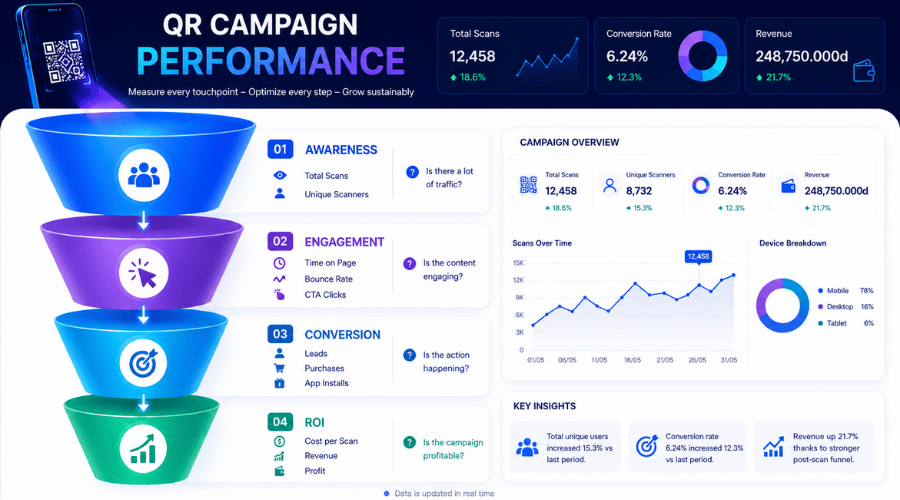 The ability to integrate QR code tracking across every physical touchpoint to optimize the post-purchase customer experience.
Real-World Applications of QR Tracking
QR codes can appear at many different touchpoints — and each one is measurable if set up correctly. Here are the most common use cases for small and mid-sized businesses:
Product packaging: Measure post-purchase scan rates, engagement by product line, and performance by distribution region.
POSM and OOH: Track performance across banner, standee, and display locations to optimize material allocation.
Event tracking: Measure interactions at each event, distinguish scan sources, and track post-event conversions.
Loyalty and customer retention: Monitor loyalty program participation rates, return visit frequency, and customer behavior over time.
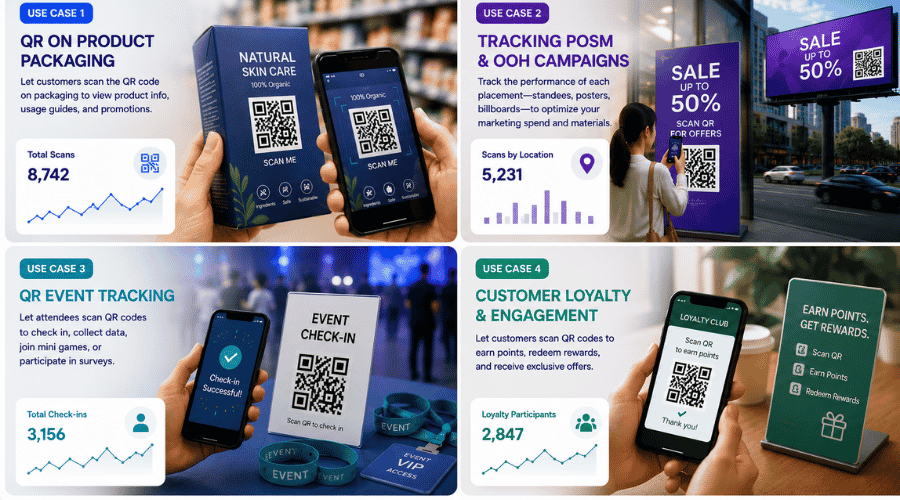 Establishing a multi-layer measurement mindset through QR code tracking to demonstrate marketing ROI effectiveness.
FAQ
What are the most common mistakes in QR code tracking?
The four most frequent errors:
Using static QR codes that produce no tracking data.
Inconsistent UTM naming that fragments data across reports.
Failing to test before printing or deploying.
Focusing only on scan volume while ignoring actual conversions.
Can I track QR codes using Google Analytics?
Yes, but Google Analytics only records activity when the user reaches the landing page. For complete tracking, you need dynamic QR + UTM parameters + Google Analytics working together.
How accurate is QR tracking data?
Accuracy is typically above 95% for scans, device data, and location. Margin of error mainly comes from tracking blockers, automated scans, or dropped network connections during the redirect.
Can I track conversions after a scan?
Yes. Combining dynamic QR codes, UTM parameters, and Google Analytics lets you track the full journey from scan to purchase, sign-up, or app download.
Does QR tracking violate user privacy?
No. The system collects technical data — IP address, device type, scan timestamp — similar to any standard website. It does not access personal data stored on the user's device.
QR code tracking isn't just a scan counter — it's the foundation for understanding the real performance of your offline and online marketing activities. When implemented correctly, QR data helps you optimize campaigns, improve conversions, and make decisions based on evidence rather than assumptions.



