

What Is ITF-14 Barcode? Structure, Applications and Implementation Guide for Businesses
ITF-14 is the standard barcode used to identify cartons, shipping units, and packaging in logistics and product distribution. If your business supplies products to supermarkets, distribution centers, or export markets, understanding ITF-14 and applying it correctly will help you meet partner requirements and avoid labeling errors in your operations.
What Is ITF-14 Barcode?
Definition of ITF-14 Barcode
ITF-14 is a barcode symbology that encodes 14 digits, standardized by GS1 to identify trade units in the supply chain.
Its full name is Interleaved 2 of 5 — 14 digits, where "Interleaved 2 of 5" (I2/5) is the underlying encoding method: digit pairs are encoded in an interleaved pattern, with odd-position digits encoded in the bars and even-position digits encoded in the spaces between them. This interleaving mechanism allows ITF-14 to store more information in the same physical space compared to standard 1D barcodes.
ITF-14 is part of the global GS1 standard system and is one of the symbologies used to encode GTIN-14 — the 14-digit Global Trade Item Number.
What Does ITF-14 Identify?
ITF-14 is not used for individual retail items. This barcode is designed for higher-level packaging units: cartons containing multiple products, multi-carton bundles, or pallets in warehouse and transport environments.
Structure of ITF-14
What Are the Components of ITF-14?
A complete ITF-14 code consists of exactly 14 digits, divided into 4 parts:
Indicator Digit (1 digit): The packaging level indicator, from 1 to 8, defining the packaging hierarchy (e.g., 1 = case of 10 units, 2 = case of 100 units). The digit 9 is reserved for non-standard packaging configurations.
GS1 Company Prefix (7–11 digits): The prefix assigned by GS1, with variable length depending on your membership tier.
Item Reference: The remaining digits after subtracting the indicator digit and check digit.
Check Digit (1 digit): A verification digit calculated using the Modulo 10 algorithm to confirm the accuracy of the full number string.
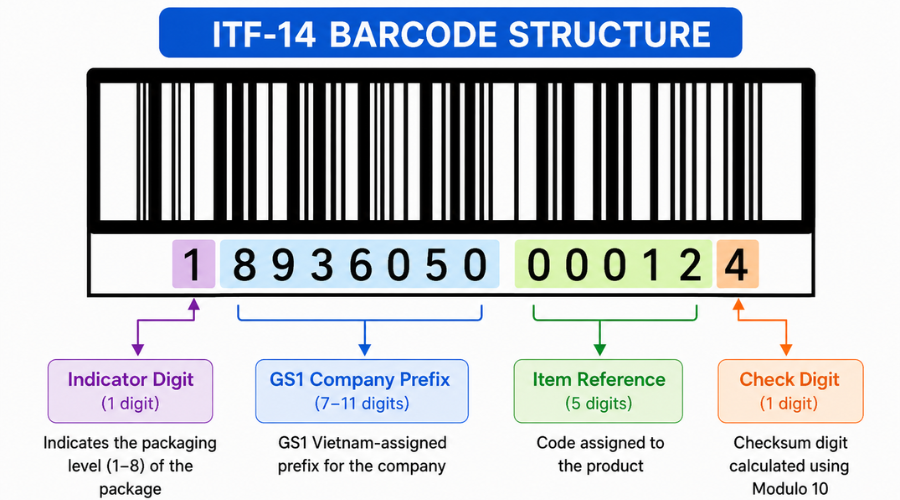 ITF-14 structure consists of the Indicator Digit, GS1 Company Prefix, Item Reference, and Check Digit.
The Meaning of the 14 Digits in ITF-14
The 14 digits in ITF-14 are the GTIN-14, built from the product's EAN-13. To create a GTIN-14, businesses simply add one Indicator Digit at the front of the EAN-13 to generate the carton-level code.
Example of a Complete ITF-14 Code
How Does ITF-14 Work?
The Interleaved 2 of 5 Encoding Principle
Interleaved 2 of 5 encodes each pair of 2 digits simultaneously: the first digit is encoded in 5 bars, and the second digit is encoded in the 5 spaces interleaved between those bars.
Within each group of 5 bars or 5 spaces, exactly 2 elements are wide and 3 are narrow — this is the origin of the name "2 of 5". The interleaving mechanism makes the barcode significantly more compact than other 1D symbologies for the same amount of data.
Why Is ITF-14 Well-Suited for Carton Packaging?
Three key reasons why ITF-14 has become the standard for shipping cases:
Easy to print directly: Does not require high print resolution. Can be printed with inkjet or thermal transfer printers directly onto corrugated cardboard while still ensuring scan quality.
Withstands warehouse and logistics conditions: The Bearer Bar — a rectangular frame surrounding the barcode — protects the code from misreads at oblique scanning angles and helps distribute ink pressure evenly across the print surface.
Readable from a distance: Its larger size compared to EAN-13 allows conveyor scanners and warehouse handheld scanners to read it from 30–100 cm depending on the device.
How Does ITF-14 Differ from EAN-13 and Other Barcodes?
ITF-14 vs EAN-13 Comparison
EAN-13 and ITF-14 are not interchangeable — they serve two different levels of the supply chain. A properly labeled shipment will have EAN-13 on each individual product inside and ITF-14 on the outer carton.
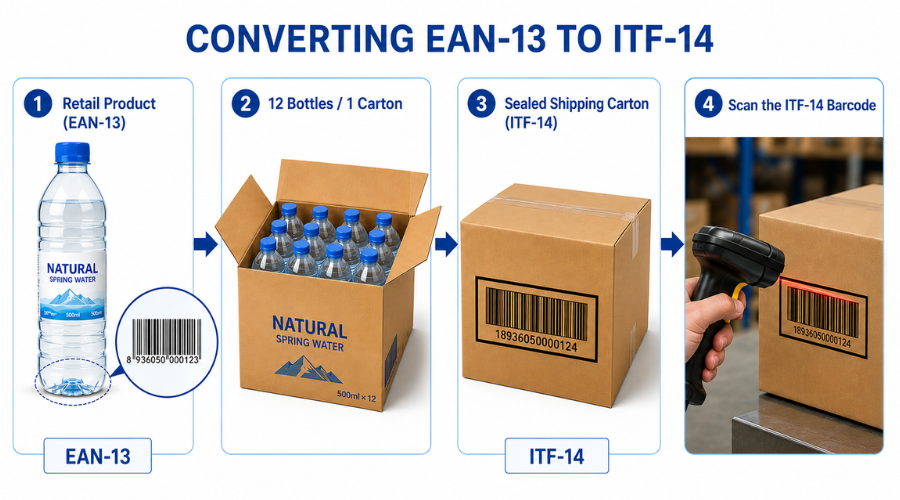 ITF-14 is derived from the product's GTIN to identify cartons and packaging units, supporting more efficient warehouse management and product distribution.
When Is ITF-14 Required Instead of EAN-13?
Not every business needs ITF-14 immediately. But in the following scenarios, it becomes a mandatory requirement:
Supplying to major supermarket chains: MM Mega Market, Central Retail (Big C, GO!), and the Co.opmart network require incoming cartons to carry ITF-14 so their WMS systems can automatically identify and process shipments.
Exporting under international GS1 standards: Foreign partners and global supply chains require ITF-14 on shipping units in compliance with GS1 regulations.
Standardizing internal warehouse operations: Businesses with multiple SKUs and multiple packaging levels need ITF-14 to distinguish between "a case of 6" and "a case of 12" of the same product.
According to GS1 Vietnam, businesses that already hold a GS1 company prefix can create ITF-14 codes on their own without additional registration — they only need to define the correct Indicator Digit and calculate the check digit.
ITF-14 vs GS1-128 and UPC
Both ITF-14 and GS1-128 are used on shipping cartons, but ITF-14 only encodes the GTIN-14 for product identification, while GS1-128 can carry additional data such as lot numbers, production dates, or expiry dates. ITF-14 is therefore suitable for basic carton identification, while GS1-128 is the better choice when detailed traceability information needs to be embedded in the barcode.
Real-World Applications of ITF-14 in Business
Managing cartons in warehouse and distribution operations.
Supporting inbound, outbound, and batch-level inventory counts.
Automated identification and sorting of goods on conveyor systems.
Reconciling carton quantities against purchase orders in WMS.
For effective implementation, businesses need scanners that support ITF-14, software that correctly recognizes 14-digit GTIN formats, and accurate data maintained in the system. Modern product management and traceability solutions support ITF-14 integration directly into inbound and outbound warehouse workflows, enabling businesses to standardize their entire barcode system from individual products to shipping cases.
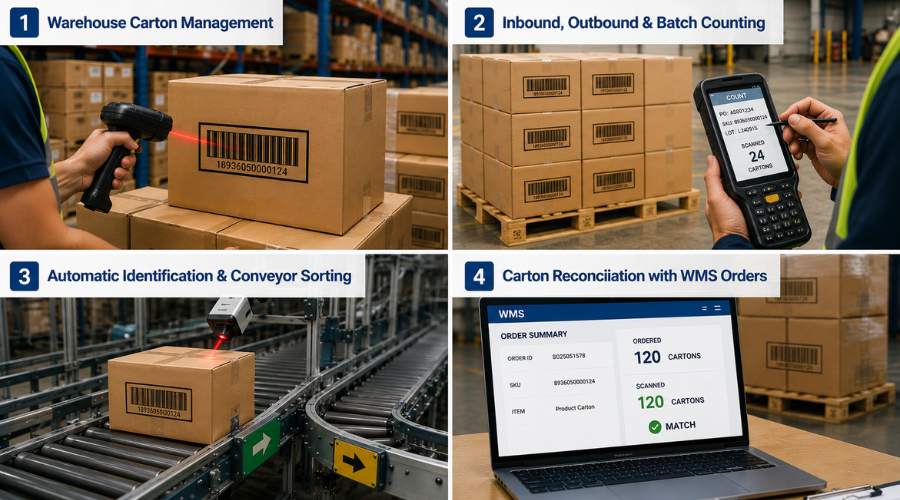 ITF-14 supports carton identification, automated counting, and goods flow management in modern warehousing, logistics, and distribution systems.
How to Create ITF-14 Barcodes
Prerequisites for Creating ITF-14
Businesses must hold a valid GS1 company prefix — registered through GS1. This is a prerequisite because the Indicator Digit and item reference must be built on a GS1 prefix to guarantee global uniqueness.
Steps to Create an ITF-14 Code
Step 1 — Identify the GTIN-13 of the individual product: Take the existing EAN-13 of the product to be packed into the case.
Step 2 — Define the Indicator Digit: Choose a number from 1–8 corresponding to the packaging level. For example: a case of 10 uses digit 1, a case of 20 uses digit 2.
Step 3 — Combine into a 13-digit string: Place the Indicator Digit before the EAN-13, remove the old EAN-13 check digit, resulting in a new 13-digit string.
Step 4 — Calculate the new Check Digit: Apply the Modulo 10 algorithm to the 13-digit string above to produce the 14th check digit.
Step 5 — Generate the barcode and print on packaging: Enter the 14-digit string into a barcode generator, export the file, and print it onto the carton at the correct size.
Online Tools to Generate ITF-14
Businesses can generate ITF-14 codes free of charge using online tools such as TEC-IT Barcode Generator, Barcode Generator, or dedicated software like BarTender and NiceLabel.
Simply enter a valid GTIN-14 and the system will automatically generate the ITF-14 barcode for download and printing. For businesses needing to generate codes in bulk across many SKUs, software that supports batch generation and direct print export is recommended to streamline the management workflow.
You can also use the free online barcode generator from iCheckQR to create and export multiple barcode formats for product management, warehousing, and packaging.
ITF-14 Print Standards for Packaging
Standard Dimensions
According to GS1, the standard size of ITF-14 is 142.75mm x 32mm (100% magnification).
The minimum allowed size is 71.40mm x 12.70mm (50% magnification) — used only when the carton is very small and only at retail POS.
In warehouse and conveyor environments, print at or near 100% magnification to ensure reliable scanner reads.
Placement on the Carton
Place ITF-14 on one of the large faces of the carton, at least 19mm from any edge. The Quiet Zone — the clear area surrounding the barcode — must be at least 10 times the width of the narrowest bar on both ends of the code. Do not place the barcode on the bottom or top flaps, as these are easily obscured when cases are stacked.
Common Printing Errors with ITF-14
Code too small: Printing below 50% magnification means warehouse scanners cannot read it from a standard working distance.
Insufficient Quiet Zone: Not leaving enough clear space on both ends prevents scanners from detecting the start and end of the barcode.
Printing on curved or folded surfaces: Bars become distorted, causing misreads or complete scan failure.
Missing Bearer Bar: Some barcode tools omit the Bearer Bar by default — this option must be enabled when printing on corrugated cartons.
Key Considerations When Using ITF-14
ITF-14 is for shipping units only — do not apply it to individual retail products sold at point of sale, as POS systems are not designed to process 14-digit codes.
Before deploying, always verify scan performance using a warehouse scanner or PDA — do not rely on visual inspection alone.
Ensure that the GTIN-14 on the carton matches the data in your WMS to prevent discrepancies during inbound and outbound operations.
Frequently Asked Questions About ITF-14
Is ITF-14 a barcode number?
No. ITF-14 is a barcode symbology used to represent the GTIN-14 number as a series of bars that scanners can read.
Can ITF-14 replace EAN-13?
No. EAN-13 is for individual retail products, while ITF-14 is for cartons and packaging units in the supply chain. They serve different levels and cannot replace each other.
Can ITF-14 be generated for free?
Yes. Many online tools support free ITF-14 generation, but businesses still need a valid GS1 prefix to create a compliant GTIN-14.
Does ITF-14 require a separate GS1 registration?
No separate ITF-14 registration is needed. However, businesses must have a GS1 company prefix to generate a valid GTIN-14.
ITF-14 is a critical standard for carton identification and supply chain management. To implement it effectively, businesses need to build the correct GTIN-14, comply with print specifications, and verify scan performance in real-world conditions. Try the free barcode generator from iCheckQR to create and manage barcodes quickly and accurately.
