
How to Create Barcodes for Shopee Sellers: Fast, Free, A–Z Guide
Not sure where to start with Shopee barcodes? Many sellers hit a wall near the end of their product listing — everything's filled in, then the barcode field stops them cold. Handmade goods, self-produced items, and freshly sourced products rarely come with a barcode. But Shopee needs one to approve the listing, and leaving it blank or entering the wrong format sends the product straight back for revision.
This guide covers how to create a Shopee-compliant barcode quickly and for free — plus the most common mistakes to avoid so your product gets approved on the first try.
Is a Barcode Required to Sell on Shopee?
Not all products require a barcode to be listed on Shopee. Whether you need one depends on the type of goods you’re selling.
Branded products — such as cosmetics, electronics, or packaged food — typically come with a barcode already printed on the packaging. Shopee recommends entering this code accurately so the system can verify and authenticate the product’s origin. For this category, leaving the barcode field empty can reduce listing visibility and shop credibility.
Self-produced items, handmade goods, or local specialty products usually don’t have an internationally registered barcode. Shopee allows leaving this field blank or using a self-generated internal code for inventory purposes. That said, if you’re selling at scale or plan to expand across multiple channels, setting up barcodes from the start will make inventory management significantly easier down the line.
What Barcode Formats Does Shopee Accept?
Shopee accepts several barcode formats, including EAN-13, UPC-A, and GTIN.
EAN-13 — A 13-digit barcode commonly used on retail products worldwide.
UPC-A — A 12-digit barcode standard primarily used in North America.
GTIN — A global product identification system that includes both EAN and UPC formats.
EAN-13 is the most commonly used barcode standard in Vietnam. Understanding how an EAN-13 barcode for products works can help ensure your products meet Shopee's barcode requirements.
How to Create a Barcode for Shopee: Step-by-Step (Free)
There are three common ways to generate a barcode for Shopee products, depending on your scale and needs.
Method 1: Use an Online Barcode Generator
This is the fastest method — no software installation needed, ideal for beginners or anyone who needs to generate a few dozen codes.
Step 1: Visit a free Shopee barcode generator such as TEC-IT, iCheckQR or Barcode Lookup. Select the EAN-13 format and enter the number sequence you want to encode. These tools support standard barcode formats and can export high-resolution image files for product labels and packaging.
Step 2: Select the barcode format. For products sold on Shopee Vietnam, choose EAN-13. Enter your chosen number string or let the tool auto-generate one. Note: if entering manually, avoid duplicating barcodes already in circulation.
 EAN-13 barcode on icheckqr.com/barcode#ean13 helps Shopee identify and manage products more accurately.
Step 3: Click generate, then download the PNG or SVG file. Paste the barcode number into the "GTIN" field in Shopee Seller Center, and print the barcode to stick on packaging if needed.
 Barcode helps sync inventory and reduce errors when listing products on Shopee. (Source: Shopee Uni)
Method 2: BigSeller + Shopee Integration — Auto-generate Barcodes by SKU
If you manage a large product catalog or already use a sales management platform, BigSeller is a significant time-saver.
Step 1: Sign up for a BigSeller account and connect it to your Shopee store through the channel integration settings.
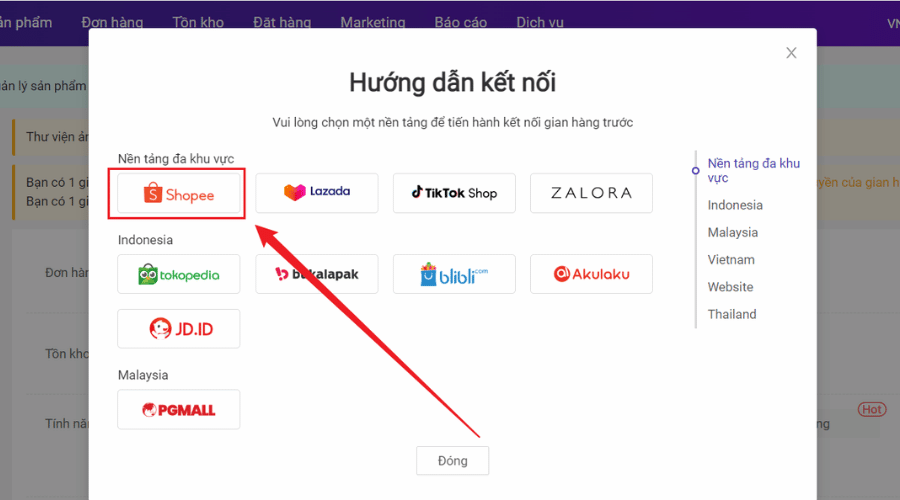 BigSeller supports automatic barcode generation, making it well-suited for shops managing large inventories and operating across multiple sales channels. (Source: BigSeller)
Step 2: When adding products or restocking inventory, BigSeller can automatically generate a barcode for each item. These codes can then be converted into barcodes and synced back to Shopee.
 BigSeller lets shop owners set up barcodes for Shopee products all within one platform. (Source: BigSeller)
Step 3: Export barcode label files in bulk by batch, print them out, and stick them on your products. The entire process — from generating codes to printing labels — can be done in minutes, even for catalogs with hundreds of products.
 Bulk exporting and printing barcode labels helps Shopee shops manage hundreds of products with synchronized barcodes.
Method 3: Excel + Barcode Font — No Additional Software Needed
Step 1: Download and install a free barcode font — the most widely used options are Code 39 or Code 128 — search Google for "free barcode font". Install it like any regular font on your computer.
Step 2: Open Excel, enter your SKU numbers or product codes in column A. In column B, use the formula to add the start and end characters required by Code 39: ="*"&A1&"*".
Step 3: Select column B and change the font to the barcode font you just installed. The numbers will automatically render as a linear barcode. You can then print directly from Excel or take a screenshot to use elsewhere.
This approach suits small shop owners who want full control over their data without relying on third-party software. If you're already comfortable working with spreadsheets, creating barcodes in Excel is worth considering — just install a barcode font and print directly from your existing data file.
 Generating product barcodes in Excel using a Code 39 font allows you to print barcodes directly from your data sheet and manage product information with greater flexibility.
Can You List Products on Shopee Without a Barcode?
Yes. Shopee doesn't require barcodes for all product types — you can create listings and sell normally with the barcode field left blank.
Long-term, though, selling without barcodes creates real limitations. Inventory management gets complicated as your catalog grows — tracking stock, inbound/outbound movements, and order reconciliation becomes difficult without a clear identifier for each product. If you plan to sell across multiple platforms like Shopee, TikTok Shop, or Lazada, syncing inventory is nearly impossible without unified barcodes or SKUs.
For craft products, skipping this step is perfectly fine — but having a handmade product barcode helps you manage variants more clearly and makes your labels look more professional as your shop starts to scale
Common Mistakes When Creating Barcodes for Shopee
Shopee says barcode is invalid
This usually means a format error. EAN-13 requires exactly 13 digits, UPC-A requires 12 — one digit off and Shopee rejects it immediately.
EAN-13 also has a check digit at the end calculated by a specific algorithm. If you enter a random number without the correct check digit, it'll fail. Most online barcode generators handle this automatically — just enter the first 12 digits and the tool fills in the 13th.
Barcode generated but won't scan
The most common cause is low print resolution. Barcodes need at least 300 DPI to scan reliably. Enlarging a low-res PNG blurs the bars and makes them unreadable.
Barcode conflicts with another product
Random EAN-13 numbers may accidentally match a registered brand's barcode, causing scan or lookup errors. To avoid this, use internal barcodes starting with "200–299" — this range is internationally reserved for internal use and won't conflict with registered commercial barcodes.
Self-Generated vs. GS1 Official Barcodes: What’s the Difference?
This is a point many sellers confuse. Both self-generated barcodes and official GS1 codes can be used on Shopee, but their purpose and scope are entirely different.
If you’re only selling on Shopee or a few domestic e-commerce platforms, a self-generated barcode is sufficient. If you’re building a brand, planning to get products into supermarkets, or exporting, registering a GS1 code is a worthwhile investment — it’s the only format recognized and verified by global retail systems.
FAQ
Does Shopee Verify Barcodes?
Shopee checks the format of the barcode when you enter it into the system. However, Shopee does not verify whether the code is registered with GS1 — meaning a self-generated internal code will be accepted as long as the format is correct.
What Barcode Should I Use for Handmade Products?
For handmade goods, you can use a self-created internal code in EAN-13 or Code 128 format. GS1 registration is not required. Just ensure the code follows the correct format and is unique across your product catalog.
Can Free Barcodes Be Used Long-Term?
Absolutely. Self-generated barcodes have no expiry date. As long as you maintain a mapping record between the barcode and the corresponding product — in an Excel file or inventory management software — they can be used indefinitely at no cost.
Create a Shopee Barcode for Free in 30 Seconds
No software to install, no paid subscription needed. Just visit an online barcode generator, select the EAN-13 format, enter your product number, download the file, and paste the code into Shopee Seller Center.
Creating barcodes for Shopee doesn’t have to be complicated. Starting with a proper barcode format early can make inventory management, product listing, and multi-channel selling much easier as your store grows.
If needed, you can try creating barcodes online to generate EAN-13, Code 128, or bulk barcodes for Shopee and inventory management.