
Common Barcode Types and Their Real-World Applications
Barcodes are a core data-identification technology in retail, manufacturing, healthcare, and logistics. Even so, each type of code — such as EAN-13, EAN-8, UPC, Code 39, Code 128, ITF-14, QR Code, or Data Matrix — is designed with its own structure to serve a specific purpose.
Understanding the characteristics of each type helps businesses choose the right standard to optimize operations. In this article, iCheckQR will distinguish between the most common types of barcodes and guide you on how to create codes quickly and completely free of charge.
What is a Barcode?
Barcode is a method of encoding data using black bars and spaces, or two-dimensional pixel patterns, so that a scanner can read and convert it into the corresponding information.
Instead of entering data manually, users only need to use a barcode scanner or a phone camera to retrieve product information within seconds. As a result, barcodes have become one of the foundational technologies of modern retail operations and supply chain management.
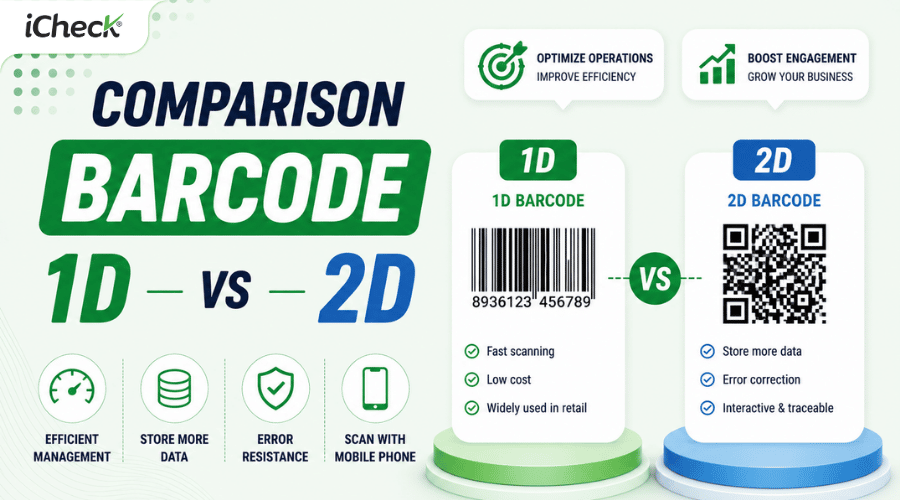
Depending on the amount of data that needs to be stored, barcodes are divided into two main groups:
1D Barcode (One-dimensional Barcode): stores data along a single horizontal direction using bars and spaces.
2D Barcode (Two-dimensional Barcode): stores data both horizontally and vertically in the form of a pixel matrix.
Each type has its own advantages in terms of data capacity, scanning speed, and range of applications.
Benefits of Using Barcodes
Regardless of the industry, using barcodes brings many benefits to businesses:
Automating inventory management processes.
Reducing errors in manual data entry.
Faster and more accurate stock-taking.
Supporting instant retrieval of product information.
Speeding up checkout at points of sale.
Easy integration with ERP, POS, CRM, and WMS software.
Saving on operating and staffing costs.
Today, alongside the development of digital technology, barcodes are used not only for product management but also in marketing, electronic payments, document management, information sharing, and many other activities.
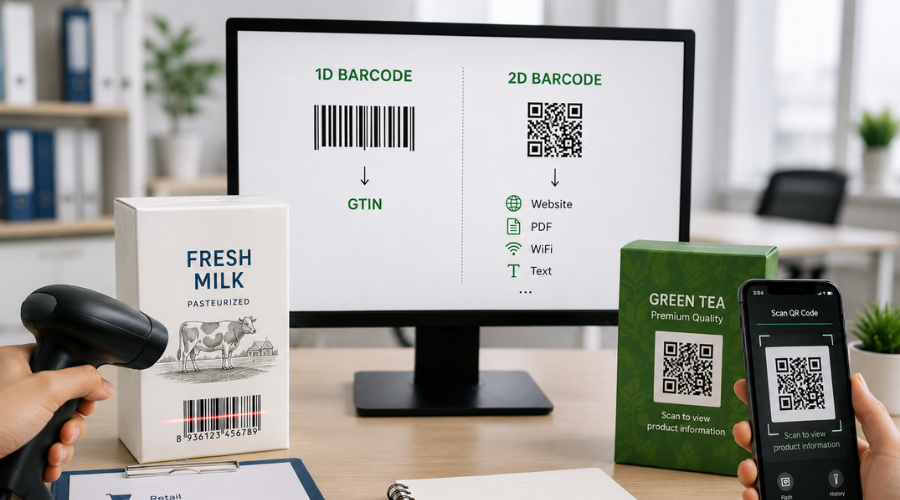 1D and 2D barcodes differ in data capacity, scanning methods, and applications, making it important to choose the right standard for each business need.
How Many Types of Barcodes Are There Today?
There are dozens of different barcode standards used around the world today. However, most businesses only use a handful of common types, depending on their industry and purpose.
Barcodes can be divided into two major groups:
The biggest difference between the two groups lies in their data storage capacity.
1D barcodes usually only contain a string of identifying characters or numbers. When the code is scanned, the system looks up the information in the corresponding database.
Meanwhile, 2D barcodes can directly store many types of data, such as: website, email, text, digital business cards, PDF files, WiFi, map locations, payment information, phone numbers
Thanks to their greater storage capacity, 2D barcodes are being increasingly applied in digital transformation and customer experience.
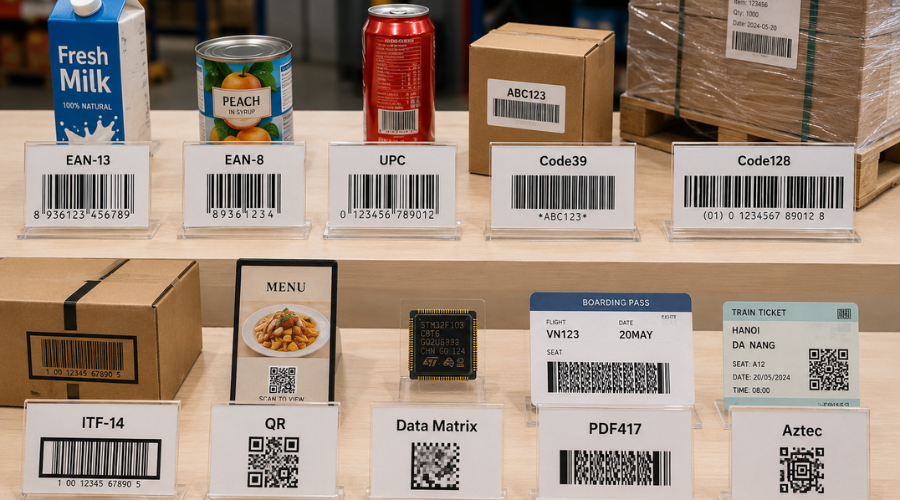 Each barcode standard is designed for specific industries such as retail, logistics, healthcare, or marketing rather than serving every application.
Common Types of 1D Barcodes and How to Create Them
1D Barcode (One-dimensional Barcode) is the traditional and most widely used type of barcode today. Data is represented by parallel black bars and spaces arranged horizontally, which is why this type is also called a Linear Barcode.
The advantages of 1D barcodes are:
Easy to print on many types of packaging.
Low implementation cost.
Fast scanning speed.
Compatible with most barcode scanners on the market.
Below are the most commonly used 1D barcode standards.
EAN-13
EAN-13 (European Article Number) is the most popular retail barcode standard in the world, developed by GS1. It is also the barcode standard widely used in Vietnam for most products in the market.
An EAN-13 code consists of 13 digits, which contain information about:
Country code.
Manufacturer code.
Product code.
Check digit.
When should you use EAN-13?
This code type is extremely well-suited for consumer goods, food, cosmetics, pharmaceuticals, household appliances, and all products sold in supermarkets and retail stores.
If a business has already been issued a manufacturer code by GS1, EAN-13 is the standard choice for printing on product packaging.
How to create an EAN-13 barcode
Once you have a valid GTIN-13 number, you can create the barcode by following these steps:
Step 1: Go to iCheckQR's barcode generator tool.
Step 2: Select the EAN-13 standard.
Step 3: Enter the 13-digit number sequence.
Step 4: Generate the code and download it in PNG or SVG format to print on the product.
EAN-8
EAN-8 is a shortened version of EAN-13 with 8 digits, designed for products with small packaging surfaces.
Due to limited printing space, small items such as lipstick, pens, candy, or other small accessories cannot use EAN-13, so EAN-8 is the more suitable choice.
How to create EAN-8
The creation process is similar to EAN-13:
Select the EAN-8 standard.
Enter a valid number sequence.
Export the code to print or use in a management system.
UPC
UPC (Universal Product Code) is a retail barcode standard used mainly in the United States and Canada.
The UPC standard has two common versions:
UPC-A consists of 12 digits.
UPC-E is a shortened version for small packaging.
If a business exports goods to the North American market, UPC is often a mandatory requirement from many retailers.
How to create UPC
You just need to:
Select the UPC standard on the code generator tool.
Enter the UPC number sequence.
Generate the code and download it for printing.
Code 39
Unlike EAN or UPC, Code 39 is designed to encode both letters and numbers.
In addition to characters from A–Z and 0–9, Code 39 also supports several special characters such as hyphen (-), slash (/), dollar sign ($), and percent (%).
Thanks to its ability to store a wide variety of characters, Code 39 is widely used in asset management, equipment inventory, employee ID cards, defense, and industrial manufacturing.
How to create Code 39
To create Code 39:
Select the Code 39 standard on iCheckQR.
Enter the character string to be encoded.
Download the code as an image to print or integrate into a management system.
Code 128
Code 128 is one of the most modern 1D barcode standards today.
Compared to Code 39, Code 128 offers better data compression, supports the entire ASCII character set, and can hold more information within the same area.
This standard is very commonly used in:
Warehousing.
Logistics.
Express delivery.
Supply chains.
Pallet management.
Waybill management.
How to create Code 128
The steps are:
Select the Code 128 standard.
Enter the data to be encoded.
Generate the code.
Export a PNG or SVG file for use.
ITF-14
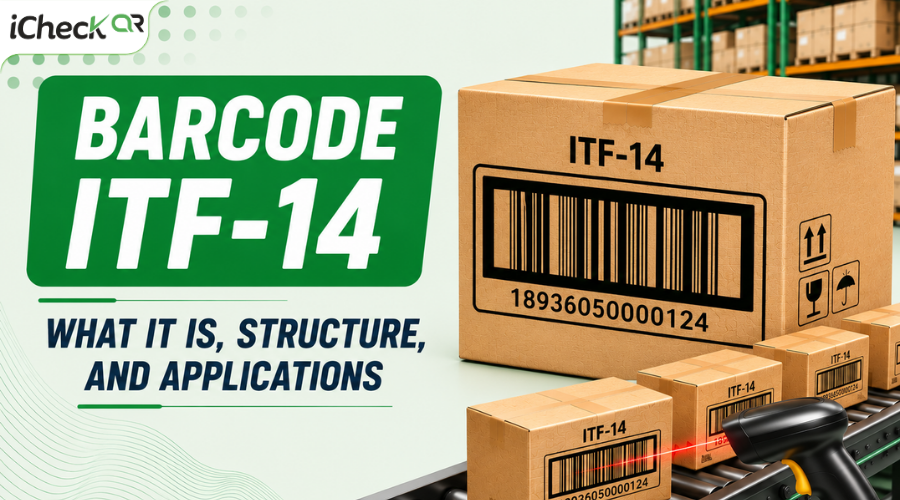
ITF-14 (Interleaved Two of Five) is a barcode standard designed to manage cartons and shipping packaging units.
Unlike EAN-13, which is used for individual retail products, ITF-14 is used at the larger packaging level to support warehouse and logistics management.
ITF-14 typically appears on:
Cartons.
Packages.
Pallets.
Shipping packaging.
How to create ITF-14
If you already have a GTIN-14 code, you just need to:
Select the ITF-14 standard.
Enter the number sequence.
Generate the code and download it to print on packaging or cartons.
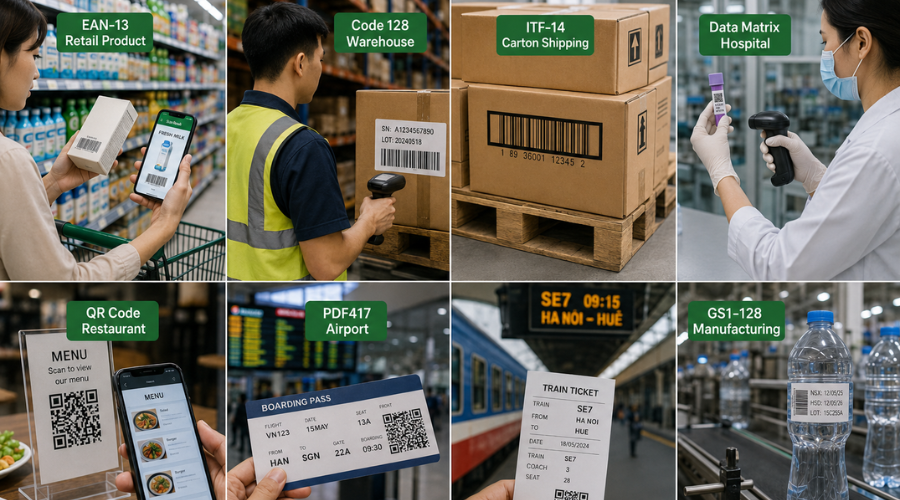 From retail and warehousing to healthcare and aviation, different industries rely on barcode standards tailored to their operational requirements.
Modern Types of 2D Barcodes and How to Create Them
Unlike 1D codes, which are mainly used to identify products, 2D barcodes (Two-dimensional Barcode) were developed to optimize space, allowing much larger amounts of data to be stored in a small area.
Instead of encoding only horizontally, 2D barcodes store data in both directions using squares or pixels. As a result, this type of code can hold thousands of characters, supports multiple data formats, and can still be scanned even when partially blurred or damaged.
Today, 2D barcodes are widely applied in:
Marketing and advertising.
Electronic payments.
Traceability.
Document management.
Medical device management.
Logistics.
E-tickets and boarding passes.
Electronic component management.
Below are the most common types of 2D barcodes today.
QR Code (Quick Response Code)
QR Code is the most widely used 2D barcode in the world. Developed by Denso Wave (Japan) in 1994, QR Code can store far more data than 1D barcodes and can be quickly scanned using either a dedicated scanner or a phone camera.
Unlike EAN-13 or Code 128, which only contain an identifying character string, QR Code can directly store many different types of information without needing to connect to an external database.
What data can a QR Code hold?
A QR Code can encode:
QR Code can store many different types of information, not just website links. Depending on your purpose, you can create a QR code containing a URL, text, a PDF file, contact information (vCard), email, social media links, an app download link, or a QR payment code.
This makes QR Code a tool that not only supports management but also marketing and digital transformation.
When should you use QR Code?
QR Code is suitable for many cases, such as:
How to create a free QR Code
You can create a QR Code in just a few steps:
Step 1: Go to iCheckQR's QR Code generator tool.
Step 2: Select the appropriate QR Code type, such as Website, Text, PDF, WiFi, Business Card, Email, Google Maps, or social media.
Step 3: Enter the content to be encoded.
Step 4: Customize the design with a logo, colors, frame, or QR eye style to match your brand identity.
Step 5: Download the QR code in PNG or SVG format for immediate use.
Tip: If the QR Code will be used on product packaging or printed materials, download the SVG format to ensure quality when enlarged without pixelation.
Data Matrix
Data Matrix is a 2D barcode standard designed to store large amounts of data in a very small space.
This type of code is square or rectangular in shape, featuring a distinctive "L"-shaped finder pattern that helps scanners quickly determine the reading direction.
Compared to QR Code, Data Matrix is typically smaller and optimized for industrial environments.
When should you use Data Matrix?
Data Matrix is suitable for industries that need to store large amounts of data in a small area while ensuring accurate retrieval.
Advantages of Data Matrix
Stores a large amount of data in a small area.
High error-correction capability.
Scans well even when scratched.
Suitable for industrial environments.
How to create Data Matrix
Creating a Data Matrix is relatively simple:
Step 1: Select the Data Matrix standard on the code generator tool.
Step 2: Enter the data string to be encoded.
Step 3: Generate the code.
Step 4: Download it to print or integrate into a management system.
PDF417
PDF417 is a stacked 2D barcode standard, with an elongated rectangular shape made up of multiple rows of data.
Compared to QR Code or Data Matrix, PDF417 has a very large data storage capacity, making it suitable for documents or papers that need to hold a lot of information.
Applications of PDF417
PDF417 is widely used in identity documents, e-tickets, waybills, and administrative records.
Thanks to its large data storage capacity, this code can hold text, identification numbers, personal information, digital signatures, and encrypted data.
How to create PDF417
You just need to:
Select the PDF417 standard.
Enter the data.
Generate the code.
Download the PNG or SVG file for use.
Aztec Code
Aztec Code is a 2D barcode standard with a special structure, featuring a finder pattern located at the center of the code.
A standout feature of Aztec Code is that it does not require a large quiet zone like QR Code, which allows it to be printed on documents with limited space.
Applications of Aztec
Aztec is commonly used for: various types of tickets, such as transportation tickets — bus, train, or plane tickets — as well as movie and event tickets
If a business needs to create codes for e-ticket management or automatic check-in, Aztec is an option worth considering.
Comparison Table of Common Barcode Types
Which Type of Barcode Should You Choose?
No single barcode type is best for every situation. The choice depends on the intended use, industry, and the business's management system.
You can refer to the table below:
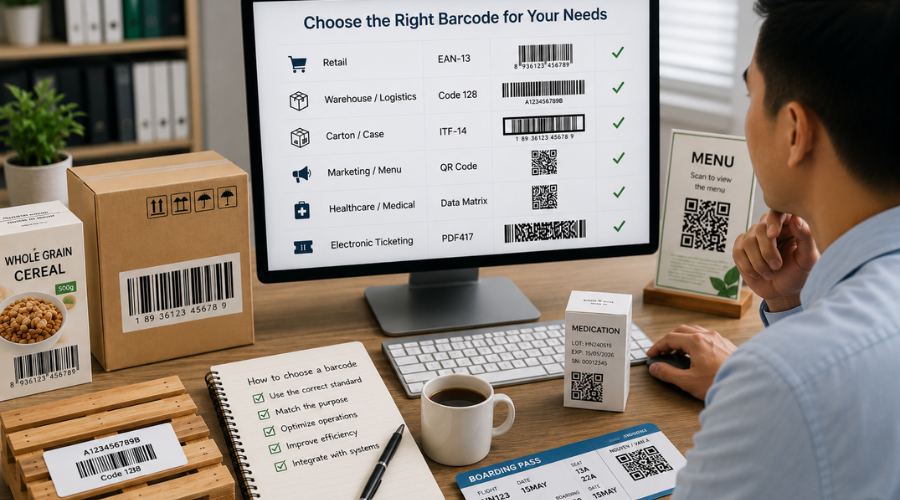 Selecting the appropriate barcode standard from the beginning helps businesses improve product management, meet system requirements, and reduce operational errors.
Advice for Choosing
EAN-13 and UPC are suitable for identifying retail products according to supermarket and e-commerce platform standards.
Code 128 and ITF-14 are the optimal choices for warehouse management, shipping, and logistics thanks to their ability to store large amounts of data.
QR Code is suitable for marketing, payments, and information sharing because it is easy to scan with a phone and supports many types of data.
Data Matrix is suitable for the healthcare, electronics, and component manufacturing industries, where large amounts of data need to be encoded in a small area while still ensuring accurate scanning.
Frequently Asked Questions About Barcode Types
Which barcode is most commonly used today?
In retail, EAN-13 is the most common in Vietnam and globally, while North America prefers UPC. For 2D codes, QR Code is used the most in marketing and electronic payments.
Can QR Code replace the EAN-13 barcode?
No. EAN-13 is used to identify retail products, while QR Code is used to store information and support online payments.
Can barcodes be created for free?
Yes. You can use free online tools such as iCheckQR to quickly create and download barcode and QR Code standards without installing any software.
Do you need to register with GS1 to create an EAN-13 code?
Registration is required if the product is to be sold on the market. If it is only for testing or internal management purposes, you can freely create your own codes using online tools.
Should you use a static or dynamic QR Code?
Choose a static code if the information is fixed (WiFi, phone number). Choose a dynamic code if you need to edit the content after printing or want to track the number of scans.
Conclusion
Choosing the right type of 1D barcode (EAN-13, UPC, Code 128...) or 2D barcode (QR Code, Data Matrix) is a core factor that helps businesses effectively optimize their operations, sales, and product management processes.
If you need to create a QR code or create a barcode quickly without installing any software, iCheckQR is the right solution. The tool supports many popular barcode standards, is simple to operate, allows interface customization, and offers high-quality downloads for printing, management, or marketing activities.