Top 5 Free Barcode Generator Software in 2026
In today's digital era and globally connected supply chains, managing and tracing product origins has become essential for every business — from retail and manufacturing to logistics. Barcodes, with their ability to encode information quickly and accurately, have become indispensable tools for optimizing warehouse operations, tracking inventory, and improving overall stock control.
To implement a barcode system effectively, businesses need the support of dedicated barcode generation software. These tools not only allow for fast and flexible creation of various barcode formats (EAN-13, QR, Code 128, etc.), but also offer printing, storage, and integration capabilities with inventory or point-of-sale systems.
This article iCheckQR compiles the Top 5 free barcode generator software tools of 2025, helping businesses reduce costs and enhance operational efficiency.
 1. Key Criteria for Choosing the Best Barcode Generator Software
Factors to Consider When Selecting Software
Choosing the right barcode generator software significantly impacts the efficiency of inventory management, warehouse operations, and sales processing. Here are the key criteria you should consider:
Diverse functional support:
Generate and print barcodes in multiple formats
Export images in PNG, SVG, or PDF
Integrate with POS systems, ERP, SAP, or warehouse management software
Support for popular barcode types:
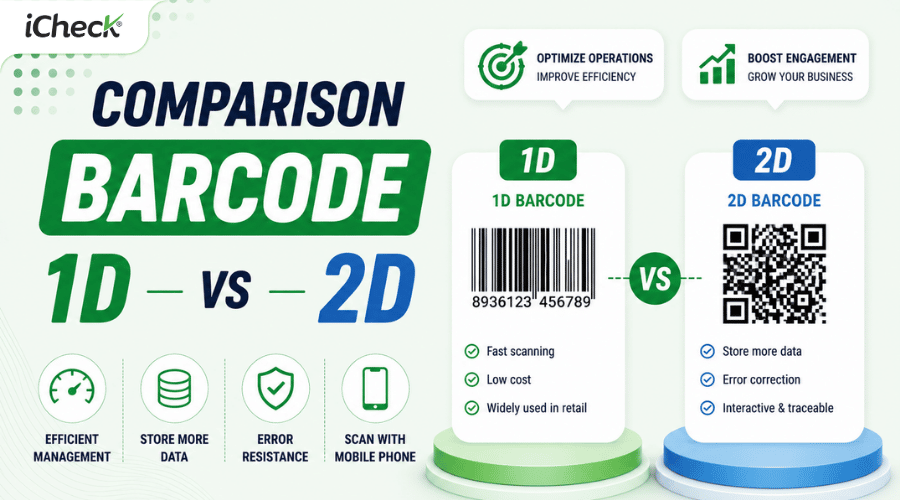
1D barcodes: EAN-13, UPC, Code 128, Code 39
2D barcodes: QR Code, Data Matrix, PDF417
User-friendly interface:
No technical expertise required
Clear instructions or intuitive design
Affordable or free to use
Reliable technical support: Documentation, FAQs, email/live chat support, or user communities.
Quick Comparison Table: Top 5 Popular Online Barcode Tools
2. Detailed review of the Top 5 Barcode Generator Software in 2025
2.1. iCheckQR
Website: icheckqr.com
 Overview & Features: iCheckQR is a free online barcode and QR code generator tailored for Vietnamese businesses. It supports various barcode formats such as EAN-8, EAN-13, UPC-A, Code 128, and QR Code. The interface is user-friendly and allows customization of color, size, and file export in PNG or SVG formats.
Pricing: Completely free, no ads, and no account registration required. However, to access advanced features, users must create an account and upgrade to a paid plan.
Pros:
Supports a wide range of barcode and QR code formats
Vietnamese interface, easy to use
No registration required; works directly on the browser
Cons:
Does not support batch barcode generation
No direct integration with POS or ERP systems
2.2. DoraBot.io
 Overview & Features: DoraBot.io provides a free online barcode generator supporting formats such as Code 128, Code 39, EAN-13, and UPC-A. Users can customize dimensions, colors, and export the barcode as a PNG file.
Pricing: Free to use, no registration required.
Pros:
Simple and intuitive interface
Supports customization of barcode color and size
No account required
Cons:
Does not support QR code generation
No batch creation feature
2.3. TEC-IT Barcode Generator
 Overview & Features: TEC-IT offers a robust barcode generator tool that supports most 1D and 2D formats such as Code 128, EAN-13, QR Code, and Data Matrix. It allows detailed customization of size, color, and image format.
Pricing: Free online version available; a paid version offers advanced features.
Pros:
Supports a wide variety of barcode and QR code formats
Advanced customization for size and appearance
API available for system integration
Cons:
English-only interface may be a barrier for non-English speakers
Some advanced features are only available in the paid version
2.4. Free-Barcode.com
 Overview & Features: Free-Barcode.com is a free online barcode generator supporting Code 128, EAN-13, and UPC-A formats. Users can customize the size and download the barcode in PNG format.
Pricing: Completely free, no registration required.
Pros:
Clean, easy-to-use interface
No account needed
Fast barcode generation
Cons:
Limited barcode format support
Lacks advanced customization features.
2.5. Barcode-Maker.com
 Overview & Features: Barcode-Maker.com provides a free online tool for generating barcodes in formats like Code 128, EAN-13, and UPC-A. It allows users to adjust dimensions and download in PNG format.
Pricing: Free to use, no registration required.
Pros:
User-friendly interface
Quick and easy barcode generation
No registration needed
Cons:
Limited support for barcode types
No advanced customization options
3. How to use popular online Barcode generator tools
3.1. iCheckQR
Step 1: Visit: https://icheckqr.com/barcode
Step 2: Choose the type of barcode you want to generate (EAN-13, Code 128, QR Code, etc.)

Step 3: Enter the data into the “Data” field
Step 4: Customize the foreground color, background color, etc.
Step 5: Preview the barcode on the right panel
Step 6: Download the barcode in PNG, WEBP, PDF, or other supported formats

3.2. DoraBot.io

Step 2: From the top menu, select “Barcode” and fill in the required fields
Step 3: Choose a suitable barcode type (EAN-13, Code 128, Code 39, etc.)
Step 4: Customize size, color, layout, and other settings
Step 5: Preview and download your barcode

3.3. TEC-IT Barcode Generator
Step 2: Select the barcode type from the list (Code 128, Code 28, EAN-8, UPC-A, etc.)
Step 3: Enter your data in the “Data” input field
Step 4: Click the “Refresh” button to generate the barcode
Step 5: Download the barcode to your device
 4. Practical Applications of Barcode Generator Software in Business
Warehouse Management and Supply Chain Optimization
In modern warehouse operations, using barcodes in combination with barcode generator software plays a critical role in automating and digitizing the entire inventory management process.
By scanning barcodes attached to each product unit or pallet, warehouse staff can:
Check real-time inventory levels with a single scan
Automatically update inbound and outbound data into ERP/POS systems without manual input
Minimize human error while accelerating order processing and logistics
 Retail Management and Warranty Activation
In the retail sector, barcodes not only speed up the checkout process but also serve as the key to:
Linking product information with the POS system
Activating digital warranties immediately upon purchase via a unique barcode on each item
Easily accessing the product’s sales, return, or warranty history with a single scan
5. Frequently asked questions about Barcode generator software
What is the best free barcode generator for small businesses?
iCheckQR and DoraBot.io are two excellent free options. They are easy to use, support popular barcode types, and offer basic integration with inventory or sales management systems.
How do I connect barcode software to a label printer?
After generating the barcode, simply export it in a common format (PNG, PDF, SVG) and use label printing software (e.g., Bartender, Zebra Designer) to send print commands to your label printer. Some tools may support direct printing via driver integration.
Which barcode type is best for supply chain use?
Code 128 and EAN-13 are the most widely used in supply chains due to their compact structure, high data capacity, and compatibility with global scanning systems.
Conclusion
In an increasingly competitive landscape where lean and efficient operations are vital, barcodes are no longer optional - they are the standard for smart business operations. Whether you run a small retail shop or a large-scale logistics company, implementing a free barcode generator can help you cut costs, reduce errors, speed up processes, and boost overall productivity.
Choose the right tool and generate your first product barcode today - just a few simple clicks, but long-term impact for your business.
Optimize operations with barcodes - the smart key to enterprise management in the Industry 4.0 era, powered by iCheckQR.