
Unique QR Code Design – Elevate Engagement with Scan Notification QR Codes
QR codes have evolved into a versatile tool across industries, capable of delivering a wide range of information the moment they're scanned. But modern QR solutions go far beyond simple link redirection — they're opening up entirely new modes of interaction. One standout advancement from iCheckQR is the Scan Notification QR Code, a tool that helps businesses connect with users instantly and more effectively than ever before.
What Is a Scan Notification QR Code?
A Scan Notification QR Code allows businesses to send an instant notification to users the moment a code is scanned. By combining QR scanning technology with push notifications, it creates a fast, direct, and seamless interactive experience. Instead of simply landing on a page, users receive immediate, targeted information — increasing both reach and response.
Benefits for Businesses
Stronger User Engagement
The moment someone scans the code, they receive an instant notification that captures attention right away, keeping them engaged with the content, campaign, or offer at hand.
Real-Time Information Delivery
Businesses can push notifications containing product updates, breaking news, or important announcements — ensuring users always receive timely, relevant information without delay.
Driving Immediate Action
Post-scan notifications can be paired with exclusive deals and clear calls-to-action, prompting users to take the next step — whether that's making a purchase, signing up, or joining an event.
A Smarter Customer Experience
The combination of scanning and instant notification delivery creates an experience that feels seamless, personalized, and intelligent — directly boosting customer satisfaction and long-term loyalty.
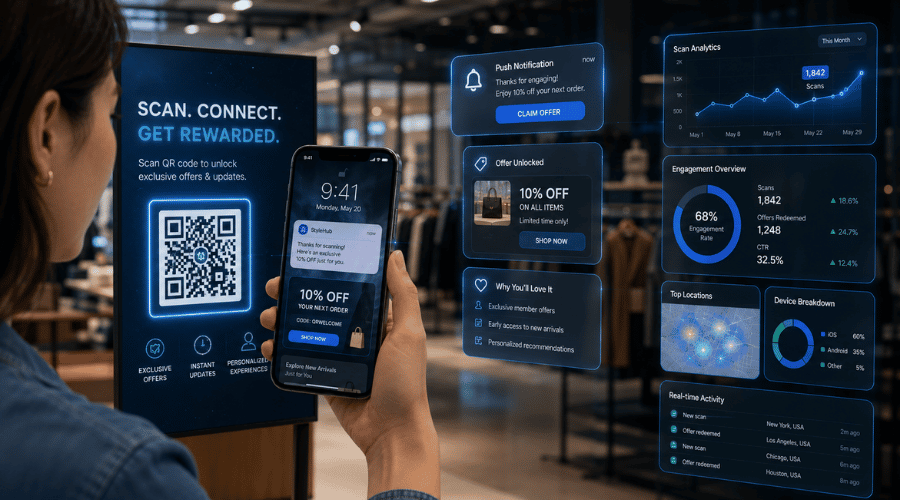 QR scan notification system improving customer engagement and real-time marketing interaction.
Key Features
Instant push notification triggered at the moment of scan
Fully customizable notification content for each campaign
Flexible deployment across both online and offline channels
Real-time tracking and performance analytics
Easy campaign optimization based on live user data
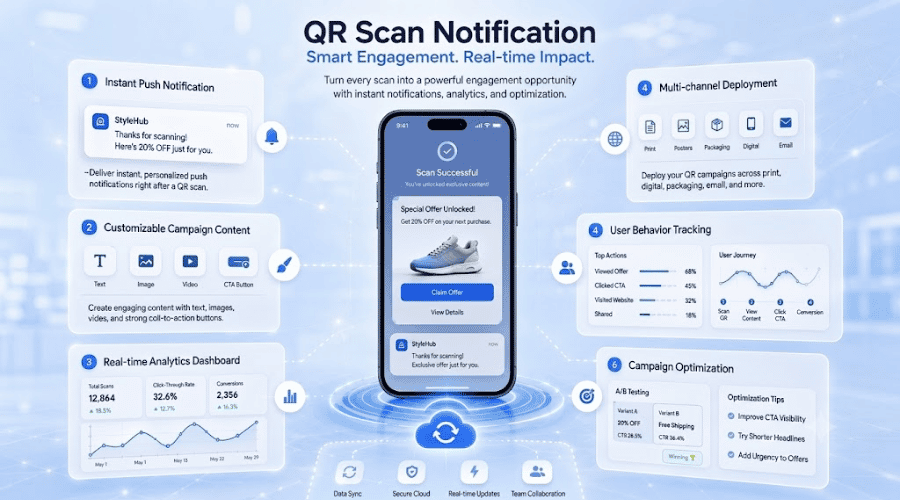 Enterprise QR notification system with campaign customization and customer interaction tracking.
How to Use Scan Notification QR Codes Effectively
Create Your QR Code
Use a QR code generator that supports notification functionality. Enter the URL or content you want users to land on. Businesses can also pair this with a QR code generator to unify product management and synchronize touchpoints across their entire sales system.
Configure Your Notifications
Set up push notification content aligned with your campaign goals — whether that's a promotional offer, a product introduction, or an event announcement.
Deploy Strategically
Place your QR codes at high-impact touchpoints: print advertising, live events, product packaging, and points of sale.
Monitor and Analyze
Track scan volume, engagement rates, and notification performance to understand exactly how users are responding and where the strongest interactions occur.
Optimize Continuously
Use the data collected to refine notification content, reposition QR codes for maximum visibility, and improve overall campaign performance over time.
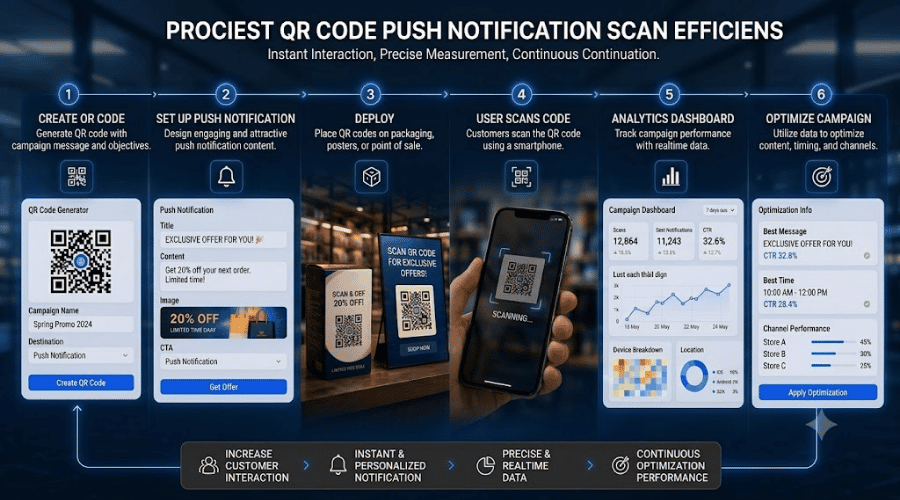 QR scan notifications help businesses deliver time-sensitive promotions and increase customer response rates across both online and offline campaigns.
Conclusion
Scan Notification QR Codes are more than a technology feature — they're a strategic tool for businesses looking to deepen customer engagement and communication. When deployed thoughtfully, every scan becomes more than a single action. It becomes a meaningful touchpoint that enhances the user experience and drives real, measurable conversion.