Tạo mã vạch cho nhà thuốc: Hướng dẫn đạt chuẩn GPP + Công cụ thực tế 2026
Không có hệ thống mã vạch, nhà thuốc không được cấp phép — đó là quy định rõ ràng trong Thông tư 02/2018/TT-BYT. Nhưng tạo mã vạch cho nhà thuốc không chỉ để đối phó đoàn kiểm tra GPP. Hệ thống mã vạch đúng chuẩn là thứ ngăn bán nhầm thuốc, kiểm soát hạn dùng và truy xuất nguồn gốc khi cần — từ nhà thuốc lẻ đến chuỗi.
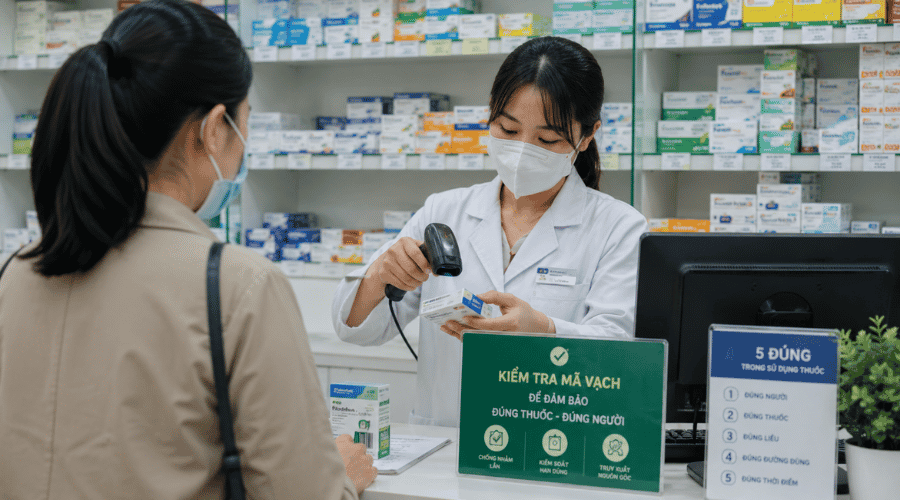 Mỗi lần quét mã tạo thêm một lớp kiểm soát an toàn trước khi thuốc đến tay khách hàng
Các loại mã vạch dùng trong nhà thuốc
Kết luận: Nhà thuốc lẻ chủ yếu cần EAN-13 và QR Code. Pharmacode dành cho nhà sản xuất — không phải yêu cầu GPP với nhà thuốc bán lẻ.
Nhà thuốc cần tạo mã vạch cho những gì?
Không phải chỉ hộp thuốc. Các đối tượng cần gắn mã trong nhà thuốc đạt chuẩn GPP bao gồm:
Hộp thuốc chưa có mã (thuốc nội địa nhỏ lẻ, thuốc pha chế theo đơn)
Phiếu nhập kho theo lô và hạn dùng
Phiếu xuất kho và hóa đơn bán hàng
Thẻ khách hàng thân thiết
Tem phụ sản phẩm nhập khẩu chưa có nhãn tiếng Việt
Cách tạo mã vạch cho nhà thuốc — theo từng phương pháp
Chọn nhanh theo quy mô: Nhà thuốc lẻ 1–2 người dùng cách công cụ 1 hoặc 2, nhà thuốc có phần mềm quản lý dùng công cụ 3, Chuỗi nhà thuốc dùng 4.
1. Tạo hàng loạt bằng Excel / Google Sheets
Đối tượng: Nhà thuốc lẻ đang chuẩn bị GPP, danh mục dưới 500 SKU, không muốn đầu tư phần mềm trả phí ngay. Phù hợp với vận đơn nội bộ và phiếu nhập kho có mã cố định — nơi dữ liệu đã có sẵn trong file danh mục thuốc.
Cột A chứa mã EAN-13 hoặc mã nội bộ của từng SKU
Tải font IDAutomationHC128 (miễn phí) → cài vào máy
Cột B nhập công thức: ="*"&A1&"*" → đổi font sang IDAutomationHC128
Mã vạch hiện ngay trong ô → in laser 300 DPI hoặc copy vào template nhãn
Lưu ý: EAN-13 cần đúng 13 chữ số chuẩn — không tự đặt tùy tiện nếu muốn tích hợp hệ thống toàn quốc.
Cách trên phù hợp khi cần tạo nhanh mã vạch hàng loạt từ danh sách sản phẩm có sẵn. Nếu muốn tìm hiểu chi tiết về cài đặt font, sử dụng công thức và tạo nhiều chuẩn mã khác nhau, bạn có thể tham khảo hướng dẫn tạo mã vạch code 128 bằng Excel.
2. Tạo thủ công bằng công cụ online miễn phí
Đối tượng: Nhà thuốc nhỏ cần tạo lẻ dưới 20 mã, dược sĩ phụ trách vận hành không có hỗ trợ IT, hoặc cần tạo nhanh tem phụ cho sản phẩm nhập khẩu mới về.
Trên thị trường có một số lựa chọn: TEC-IT mạnh về tùy chỉnh nhưng giao diện tiếng Anh; Barcode Generator tạo lẻ tức thì nhưng không chỉnh được DPI hay kích thước. iCheckQR là công cụ được phát triển bởi doanh nghiệp Việt, tối ưu cho chuẩn mã vạch lưu hành nội địa — hỗ trợ cả EAN-13, EAN-8, Code 128 và cả QR Code, giao diện tiếng Việt, không cần tài khoản.
Hướng dẫn tạo mã vạch nhà thuốc bằng iCheck QR:
Truy cập trang iCheckQR → chọn loại mã vạch EAN 13
Nhập 13 chữ số mã sản phẩm vào ô dữ liệu
Chỉnh kích thước: chiều rộng tối thiểu 25mm, chiều cao tối thiểu 15mm
Chọn độ phân giải 300 DPI → Download PNG
In lên decal nhiệt → dán lên hộp thuốc hoặc tem phụ
Lưu ý: iCheckQR phù hợp tạo lẻ — không hỗ trợ tạo hàng loạt. Nếu danh mục trên 50 SKU, kết hợp với Excel theo cách 4.1 hoặc nâng lên phần mềm quản lý nhà thuốc ở mục 4.3.
Tạo ngay mã vạch cho nhà thuốc miễn phí
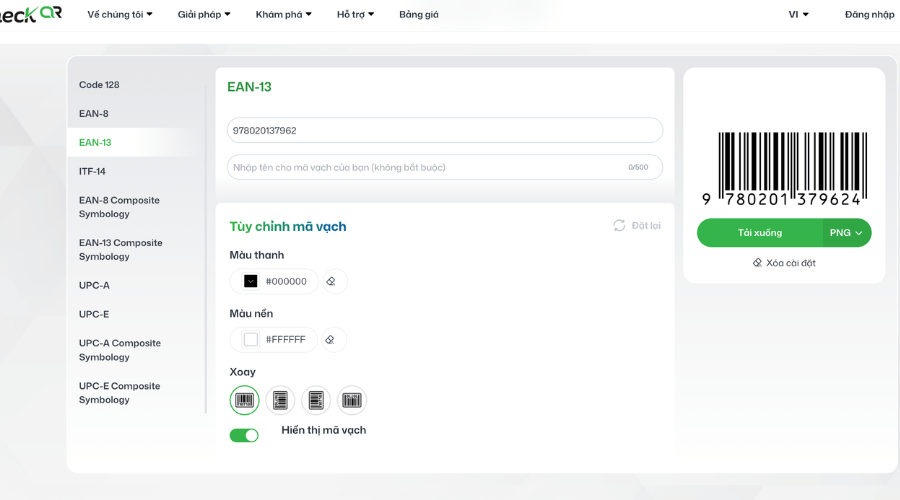 Mã EAN-13 là chuẩn được nhiều hệ thống bán lẻ và phần mềm quản lý nhà thuốc hỗ trợ để kiểm soát tồn kho và truy xuất sản phẩm.
3. Tạo hàng loạt bằng phần mềm in nhãn
Đối tượng: Nhà thuốc vừa, nhập hàng thường xuyên với số lượng lớn, cần in tem hàng loạt mỗi lần nhập kho mới. Phù hợp khi danh mục trên 200 SKU và cần template nhãn chuyên nghiệp có thêm tên thuốc, hạn dùng, giá bán.
Import danh sách thuốc từ Excel → map trường dữ liệu (tên thuốc, số lô, hạn dùng, mã EAN-13) → in thẳng máy in nhiệt để bàn. BarTender phù hợp doanh nghiệp cần tùy chỉnh cao; LabelJoy có bản miễn phí phù hợp nhà thuốc quy mô vừa.
Xem thêm: Tạo mã vạch hàng loạt bằng Excel
4. Tạo mã vạch tích hợp qua phần mềm quản lý nhà thuốc
Đối tượng: Chuỗi nhà thuốc, nhà thuốc có hợp đồng BHYT, hoặc bất kỳ nhà thuốc nào muốn chuẩn hóa toàn bộ quy trình — từ nhập kho đến bán hàng — trong một hệ thống duy nhất.
Lưu ý bắt buộc: Phần mềm quản lý nhà thuốc phải được liên kết với hệ thống quản lý của Bộ Y tế — đây là yêu cầu GPP, không phải tùy chọn.
Tích hợp BHYT điện tử: Nhà thuốc có hợp đồng BHYT cần máy quét 2D đọc được QR trên thẻ BHYT điện tử. Quy trình: quét mã thẻ BHYT → tra cứu thông tin người bệnh → xuất đơn thuốc → in phiếu tích hợp mã vạch đơn thuốc.
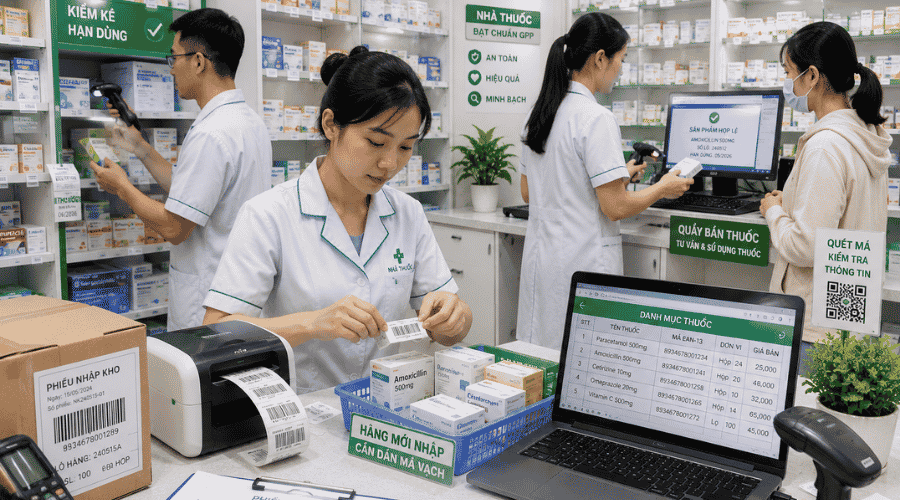 Dữ liệu mã vạch chính xác là nền tảng cho kiểm kê, bán hàng và truy xuất nguồn gốc
Nhà thuốc lẻ chủ yếu cần EAN-13 và QR Code. Pharmacode dành cho nhà sản xuất — không phải yêu cầu GPP với nhà thuốc bán lẻ. Nếu bạn muốn tìm hiểu cách tạo mã vạch cho từng loại sản phẩm, hãy xem hướng dẫn chi tiết về cách tạo mã vạch cho sản phẩm.
Quy trình triển khai hệ thống mã vạch cho nhà thuốc từ đầu
Chọn phần mềm quản lý nhà thuốc đạt chuẩn Bộ Y tế
Nhập danh mục thuốc vào hệ thống — gán mã vạch cho từng SKU
Mua thiết bị in + quét phù hợp quy mô
In tem dán cho toàn bộ hàng tồn kho hiện tại
Huấn luyện nhân viên quy trình quét khi bán và nhập kho
Thời gian triển khai: Nhà thuốc lẻ dưới 500 SKU có thể hoàn thành trong 1–2 ngày nếu danh mục đã được chuẩn hóa sẵn.
FAQ
Nhà thuốc chưa đạt GPP có tạo mã vạch được không?
Được, tạo mã vạch không yêu cầu phải có GPP trước, vì đây chỉ là một trong các bước chuẩn bị để đạt GPP, không phải điều kiện sau khi đạt.
Phần mềm quản lý nhà thuốc có cần đăng ký với Bộ Y tế không?
Có. Theo quy định GPP, phần mềm quản lý nhà thuốc phải kết nối với hệ thống dữ liệu dược quốc gia của Bộ Y tế. Danh sách phần mềm được công nhận có thể tra cứu tại cổng thông tin của Cục Quản lý Dược.
GS1-128 và Code 128 khác nhau như thế nào trong ngành dược?
Code 128 là chuẩn mã hóa thông thường. GS1-128 là phiên bản nâng cao theo quy chuẩn quốc tế, cho phép mã hóa thêm số lô, hạn dùng và số lượng trong cùng một mã. Nhà phân phối dược cần GS1-128; nhà thuốc lẻ dùng Code 128 là đủ.
Triển khai mã vạch cho nhà thuốc thường bắt đầu với EAN-13 cho bán lẻ và Code 128 cho quản lý kho nội bộ. Công cụ online, Excel, phần mềm in nhãn hay hệ thống quản lý tích hợp — mỗi tầng phục vụ một quy mô khác nhau.